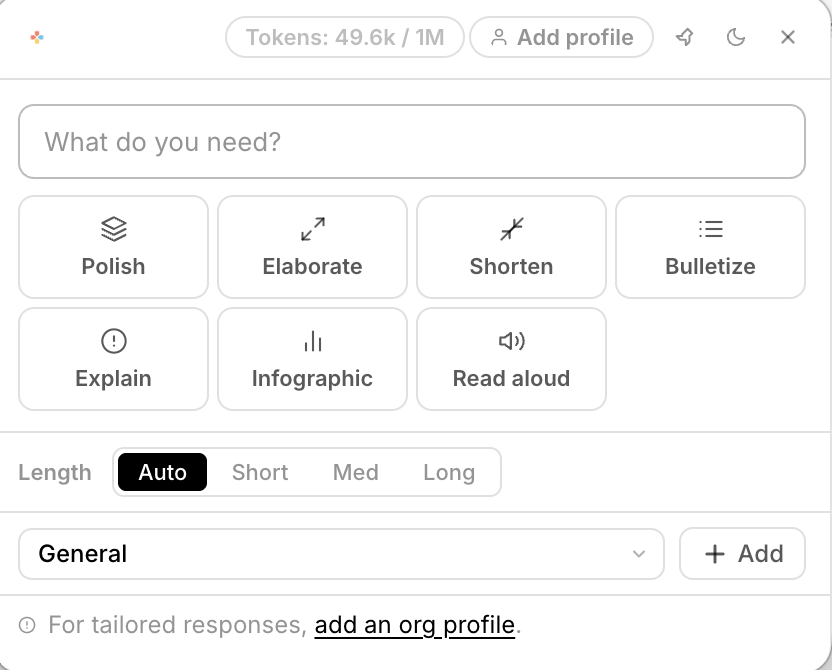
Stop paying for AI in Gmail, AI for PDFs, AI in Word. Cruxi is one floating toolbar that lives above everything — always two keystrokes away, in any app you open.
The problem
AI for email. AI for documents. AI for PDFs. AI for spreadsheets. Each one siloed, expensive, and completely unaware of everything else you've got going on.
A beautiful toolbar floats up wherever you are. Polish your email. Summarize a 90-page PDF. Explain a legal clause. Translate a slide. Draft a reply — all without switching windows, pasting into ChatGPT tabs, or losing your flow.
Ctrl + Space anywhere → toolbar appears instantly
Writing a proposal, donor report, policy, legal brief, strategy document? Upload everything relevant — the template, instructions, your past examples, org background, plans, and data. Open the blank doc, select any section heading, hit Ctrl+D, and Cruxi writes it — grounded in everything you uploaded. Section by section. Done in hours, not weeks.
Imagine uploading all your org's policies, procedures, and handbooks. Then whenever you need anything — maternity leave, vendor terms, compliance rules — just ask. Cruxi already knows. Two keystrokes away.
Imagine if...
How it works
No browser extension. No complex setup. No copy-pasting rituals. Install and go.
Why Cruxi
ChatGPT lives in a browser. Copilot only works in Microsoft apps. Per-app AI only knows that one app. Cruxi goes everywhere with you.
| Capability | ⚡ Cruxi | ChatGPT | Copilot | Per-app AI |
|---|---|---|---|---|
| Works in every app system-wide | ✓ | ✗ | ~ | ✗ |
| Reads & understands your documents | ✓ | ~ | ~ | ✗ |
| Permanent memory across sessions | ✓ | ✗ | ✗ | ✗ |
| No copy-paste to a browser tab | ✓ | ✗ | ✓ | ✗ |
| Zero hallucinations on your docs | ✓ | ✗ | ✗ | ✗ |
| Multiple context banks (HR, Legal, Finance…) | ✓ | ✗ | ✗ | ✗ |
| One price, all apps, all AI tools | ✓ | ✗ | ✗ | ✗ |
What people say
I cancelled four AI subscriptions the day I installed Cruxi. I don't miss them. Not even a little bit.
The drafting mode is genuinely unreal. I select a section, hit Ctrl+D, and it writes something I'd normally spend an hour on. From MY documents.
I uploaded our entire HR handbook once. Now every time a policy question comes up in a meeting, I just ask Cruxi. Two seconds. Correct answer. Every time.
Get started
Join people who replaced 7 AI subscriptions with one. No credit card required.
Free plan available · macOS 12+ · Windows 10+ · No credit card required