Now available — macOS & Windows

One AI.
Every app.
Everywhere.

Stop paying for AI in Gmail, AI for PDFs, AI in Word. Cruxi is one floating toolbar that lives above everything — always two keystrokes away, in any app you open.

↓ Download for free See how it works →
Q3 Strategy
Q3 Strategy Deck.docx — Microsoft Word
Q3 Strategic Growth Report
3.2 Market Expansion Strategy for Southeast Asia
Works in every app
Gmail
Word
Excel
Chrome
Notion
Slack
PDFs
Any desktop app
+ literally anything

The problem

You're basically paying rent
to seven different AIs.

AI for email. AI for documents. AI for PDFs. AI for spreadsheets. Each one siloed, expensive, and completely unaware of everything else you've got going on.

AI for Email $20/mo
AI for Docs $20/mo
AI for Spreadsheets $30/mo
AI for PDFs $15/mo
AI for Browser $10/mo
AI for Research $25/mo
AI for Chat $20/mo
Or just get Cruxi One subscription. All apps.

Press a shortcut.
In any app.

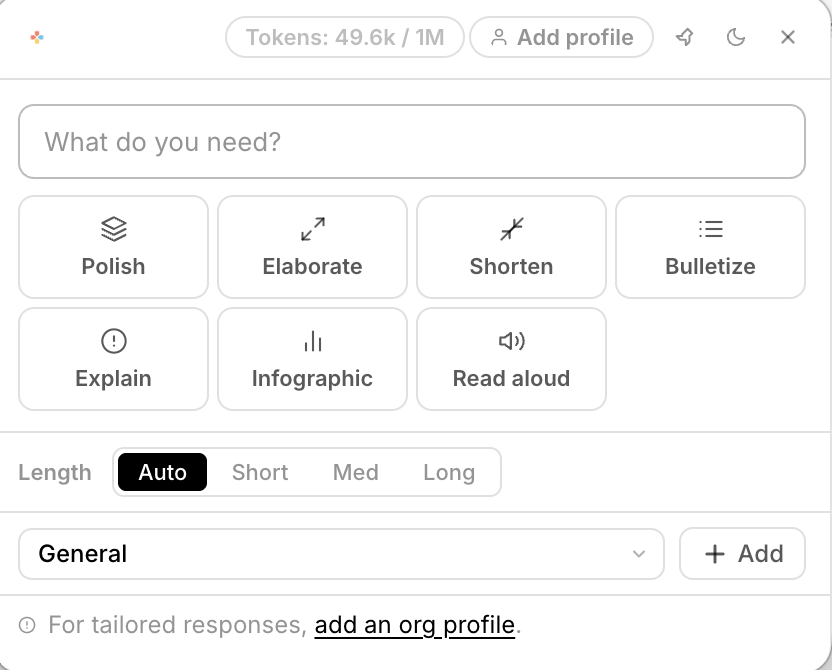
A beautiful toolbar floats up wherever you are. Polish your email. Summarize a 90-page PDF. Explain a legal clause. Translate a slide. Draft a reply — all without switching windows, pasting into ChatGPT tabs, or losing your flow.

System-wide — Gmail, Word, Chrome, Slack, literally anything on your screen
Select text → press your shortcut → choose action. Done in three seconds.
No copy-pasting to a browser tab. No context switching. Just flow.
Live demo — floating above any app

Ctrl + Space anywhere → toolbar appears instantly

Load your documents.
Draft anything,
section by section.

Writing a proposal, donor report, policy, legal brief, strategy document? Upload everything relevant — the template, instructions, your past examples, org background, plans, and data. Open the blank doc, select any section heading, hit Ctrl+D, and Cruxi writes it — grounded in everything you uploaded. Section by section. Done in hours, not weeks.

Upload any mix: PDFs, DOCX templates, Excel data, images, past examples
Works for grant proposals, donor reports, legal docs, project plans — anything structured
Every sentence grounded in your documents. Zero hallucinations.
Complex sections — budget narratives, theories of change, risk assessments — all drafted accurately
Live demo — context-aware drafting
1 Upload your docs — template, examples, data
2 Select a section heading in your doc
3 Ctrl+C → Ctrl+D → section drafted ✦

Upload once.
Know everything.
Forever.

Imagine uploading all your org's policies, procedures, and handbooks. Then whenever you need anything — maternity leave, vendor terms, compliance rules — just ask. Cruxi already knows. Two keystrokes away.

Create named context banks: "HR Policies", "Legal Docs", "Product Specs"
Switch context in the toolbar dropdown — instant domain expert
Ask anything, get answers grounded in your actual documents
Cruxi toolbar — pick your context and ask anything
Switch context → instant domain expert

See it in action for your document type.

Every profession has a different drafting nightmare. We built a full walkthrough for each.

Project Proposals
Win more bids. Write less.
From RFP to full proposal draft in hours. Upload funder guidelines, past proposals, logframes, and org profile — then draft every section with Ctrl+D.
See how it works
Donor Reports
Your data deserves a great narrative.
Turn monitoring data, activity reports, and financials into polished donor narratives. Upload your data, draft every section — achievements, challenges, next steps.
See how it works
Policy Documents
Compliant policies. Written fast.
Upload legislation, existing policies, frameworks, and templates. Draft HR policies, compliance documents, and operational procedures grounded in your actual requirements.
See how it works

Imagine if...

What if AI just worked?

Imagine if
Writing a full donor report took an afternoon, not two weeks.
Upload the funder's template, your past reports, org profile, and results data. Then open the blank proposal — select each section heading, hit Ctrl+D, and Cruxi fills it from everything you uploaded. Section by section. Done.
✓ Context drafting
Imagine if
You never had to explain your organisation to AI again.
Upload your org profile, strategy documents, and policies once. Switch to that context any time. Cruxi already knows who you are, what you do, and how you work — permanently.
✓ Permanent memory
Imagine if
Your company's full knowledge base was two keystrokes away.
Reading a vendor contract in Chrome? Hit your shortcut, switch to "Legal" context, ask "does this contradict our standard terms?" — answered instantly, from your actual legal documents.
✓ Context switching
Imagine if
Every email, reply, and message sounded exactly right.
Select any text in Gmail, Outlook, or Slack. Click Polish, Shorten, or Make Formal. Cruxi rewrites it in context — no more agonising over tone. Works in every app, instantly.
✓ Universal toolbar
Imagine if
Dense data sheets and technical specs explained in plain English.
Highlight any table, spec section, or wall of numbers in a PDF or spreadsheet. Click Explain. Cruxi breaks it down clearly — no more pretending you understood the supplier's data sheet.
✓ Explain mode
Imagine if
One AI that switches between expert domains in one click.
Grant Writing. Legal Review. HR Queries. Product Docs. Each is a named context with its own uploaded documents. Same toolbar, same shortcut — just a different brain loaded up and ready.
✓ Multi-context

Up and running
in under 3 minutes.

No browser extension. No complex setup. No copy-pasting rituals. Install and go.

1
Download & install
Install Cruxi on your Mac or Windows machine. It lives quietly in your menubar, invisible until you need it.
2
Upload your context
Drop in your documents, policies, data sheets, or reports. Cruxi reads and indexes everything automatically.
3
Work smarter everywhere
Press your shortcut in any app. Draft, ask, polish, explain — with full context, in any app, right now.

Why Cruxi

Everything else is
trapped in a tab.

ChatGPT lives in a browser. Copilot only works in Microsoft apps. Per-app AI only knows that one app. Cruxi goes everywhere with you.

Capability ⚡ Cruxi ChatGPT Copilot Per-app AI
Works in every app system-wide ~
Reads & understands your documents ~ ~
Permanent memory across sessions
No copy-paste to a browser tab
Zero hallucinations on your docs
Multiple context banks (HR, Legal, Finance…)
One price, all apps, all AI tools

What people say

Real people. Real results.

★★★★★

I cancelled four AI subscriptions the day I installed Cruxi. I don't miss them. Not even a little bit.

JR
James R.
Operations Director
★★★★★

The drafting mode is genuinely unreal. I select a section, hit Ctrl+D, and it writes something I'd normally spend an hour on. From MY documents.

MP
Mia P.
Grant Writer
★★★★★

I uploaded our entire HR handbook once. Now every time a policy question comes up in a meeting, I just ask Cruxi. Two seconds. Correct answer. Every time.

SK
Sarah K.
HR Manager

Get started

One AI.
Every app.
Free to try.

Join people who replaced 7 AI subscriptions with one. No credit card required.

Download for
macOS
Download for
Windows

Free plan available · macOS 12+ · Windows 10+ · No credit card required